• Skip to secondary menu
  • Skip to main content
  • Skip to primary sidebar
  • Skip to footer
  • Home
    • About Baburek.co
    • Privacy
    • Terms
    • Banners
      • Baburek Banners
      • Design Studio Banners
    • little Design Studio
  • Shop

baburek.co

  • Facebook
  • Instagram
  • Pinterest
  • YouTube
  • Outdoors
    • Camping
    • Hiking
  • Magazine
    • Mag : Caribbean
    • Mag: Europe
    • Mag: North America
    • Food
    • World
  • Images
    • Cover Image
    • Caribbean
    • Europe
    • North America
      • Images of Canada
      • Images of USA
    • Flora and Fauna
  • Video
    • Caribbean
    • Europe
    • North America
  • Maps
    • Africa
    • Asia
    • Australia & Oceania
    • Europe
    • Middle East
    • North America
    • Central America
    • Caribbean
    • South America
    • Antarctica
    • Arctic
  • Countries
    • Africa
      • North Africa
      • East Africa
      • Central Africa
      • West Africa
      • Southern Africa
    • Asia
      • North & West Asia
      • Southeast Asia
    • Australia and Oceania
    • Europe
      • North Europe
      • East Europe
      • Central Europe
      • West Europe
      • South Europe
    • Middle East
    • North America
    • Central America
    • Caribbean
    • South America
    • Arctic
    • Antarctica
    • Oceans
  • microBlog
    • Books
    • Design & Tech
      • Web
    • Hands-on
You are here: Home / Design / Web / Building Your Web Site – FTP Software

Building Your Web Site – FTP Software

November 18, 2009 by Baburek

To have a web site that you’ll call your own you also need to have FTP access from your computer over the network / Internet to the server where your web site is hosted.

Part of our series on establishing online presence…

Transferring (and manipulating) files from one computer to another over the network is done with FTP software.

FTP is short for File Transfer Protocol

There are numerous FTP clients (software) on the market that will enable you to do more or less the same tasks you may need when for an example transferring files from your home / office computer to the server where your web site resides.

You can also use some of the Web browsers to transfer files to FTP server.
Type in to the Web browser address bar :
 ftp(s)://<login>:<password>@<ftpserveraddress>

If you are planing to go online with your business or personal web site, and you are preparing images, layout, scripts, etc. on your local computer, then to transfer that data over the Internet your FTP client will use two transfer modes; Binary mode and ASCII mode. FTP software may have ‘Auto’ option that will automatically switch from one mode to another depending on type of file you are uploading / downloading.

Transferring files in the wrong mode will corrupt data.

Some types of files that are transferred in ASCII mode:

  • ASCII mode – plain text: .txt, .php, .css, .sql, .tpl, .html, .shtml, .xhtml, .pl, .cgi, .asp, …

Some types of files that are transferred in Binary mode:

  • Binary mode – images: .jpg, .gif, .ani-gif, .swf, …

As already mentioned, there are many FTP clients that you can choose from. One of the FTP clients that will let you start uploading, installing and setting up your web site within few minutes and it’s FREE is “FileZilla”.

FileZilla, “The free FTP solution”…

On next few screenshots we’ll show you how to add New Web Site to the “Site Manager” on FileZilla:

1. Enter basic FTP information provided to you by your server administrator or hosting company:
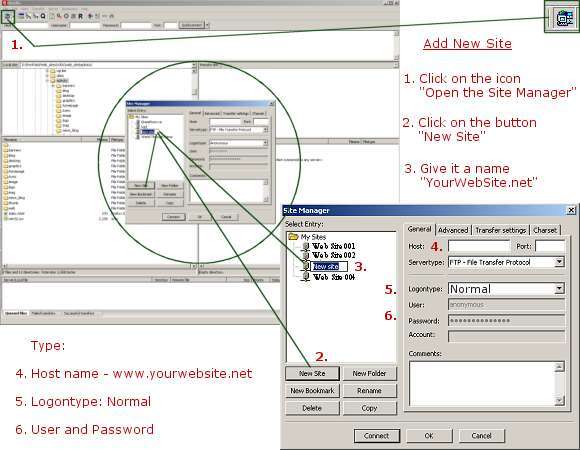
Site Manager - FileZilla - Setting up a New Site

2. Set up Advanced Settings – Find your web site folder on your computer:
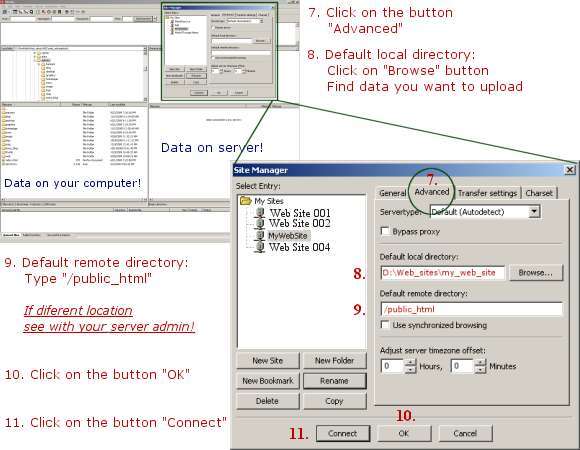
Site Manager - FileZilla - Setting up a New Site - Advanced Settings

Next time when you want to upload data on server where your web site is hosted, open FileZilla and just click on the arrow pointing down, just beside button “Open the Site manager”, choose “myWebSite” on the list (or whatever name you gave it when you were setting it up by following above instructions), click on it and within seconds you’ll have access to the server. On the left side is data on you local computer and on the right side data already on the server.

With this basic information you should be able to upload or download files from host server – your web site. Just select files or folders on your local computer and drag them (or Right click – Upload) to the server.

Partial list of few more File Transfer clients (FTP):

  • FileZilla
  • WS FTP
  • Cute FTP
  • SmartFTP
  • Fetch
    …

Filed Under: Web Tagged With: Build Your Web Site, FTP, web site

Primary Sidebar

About

Baburek.co
Timeline & window to visual episodes, perceptions, external distractions...
@ Canada & beyond [ + ]

by

Shop.Baburek.Co ✎
design, photography, web

Ad

Tag Cloud

Adriatic Africa Asia Atlantic Australia and Oceania Autumn beach camping Canada Caribbean Islands Caribbean Sea Central America Central Europe Croatia Dalmatia East Africa EU Europe Food HDR Hrvatska Indian Ocean Mediterranean Middle East Montreal Mont Tremblant North-West Asia North Africa North America North Europe Nova Scotia Ontario Pacific photos Quebec snow South-East Asia South Africa South America South Europe USA Video West Africa West Europe Winter

Footer

Baburek.co

  • Home
  • Outdoors
    • Camping
    • Hiking
  • Magazine
  • Images
  • Videos
    • Caribbean
    • Europe
    • North America
  • Maps
  • Countries

Recently Published

  • Video – Halifax
  • Video – Peggy’s Cove, Nova Scotia
  • Video – 36h on Prince Edward Island
  • Video – Hopewell Rocks
  • Video – Village Historique Acadien
  • Video – Percé, Gaspésie
  • Video – Québec City
  • Videos – Cottontail rabbit

About

  • Home
  • About Baburek.co
    • Banners
      • Baburek Banners
      • Design Studio Banners
    • Privacy
    • Terms
  • little Design Studio @ baburek.co
  • Online Shop...

Log in © 2026 · Baburek.co, All Rights Reserved